I don’t like bribery…. external motivation sounds much better.
When internal motivation, the ideal, is not there and probably will not show up anytime soon, then I feel I need to move onto external motivation. Thus, my little store. (I don’t start this is in September, it would be too expensive.)
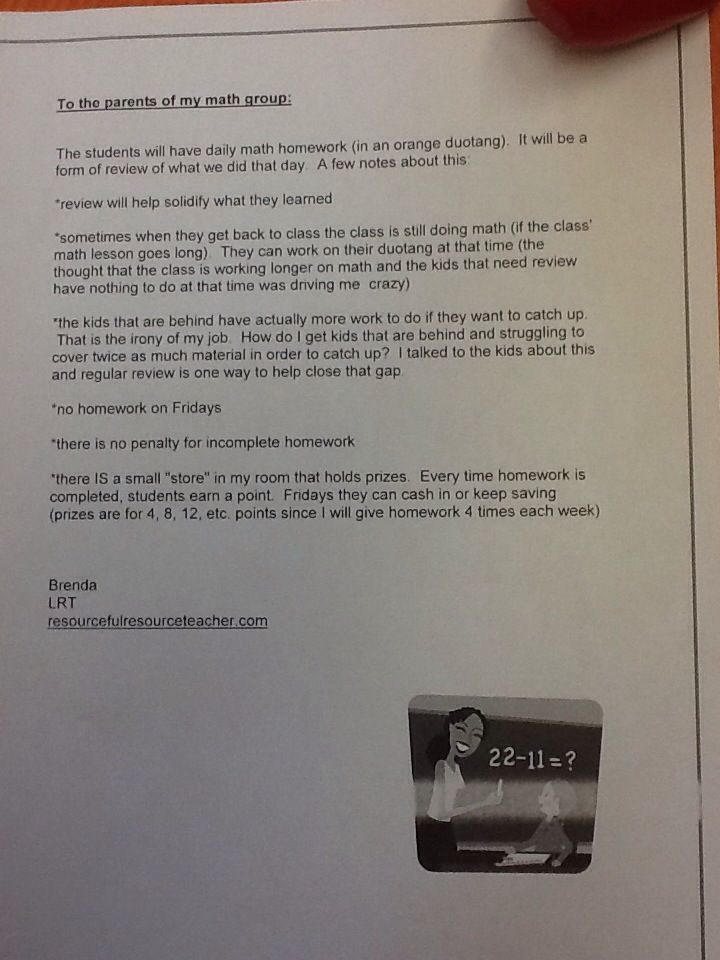
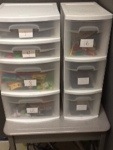
My math students were challenged yesterday to do daily homework 4 days a week (not Friday). Notes about how this will work is outlined in my letter below. So far everyone has 100% completion!
Author Archives: resourcefulresourceteacher
I Don’t Like Bribery But….
Moving from Defeat to Success
Two weeks ago, when beginning to learn the countries of South America, a student stated , “There’s no point doing this, I’m going to fail anyways.”
One week ago, after studying with a mneumonic and matching visuals, I casually asked what he got on his quiz and he said, “100%.”
Today I announced that I had a mneumonic and visual for learning the countries of Central America and the same student declared, “Bring it on!!”
What a difference success can make!
You Know What’s Hard About Being A Special Ed Teacher?
You know what’s hard about being a special ed teacher? You want to fix things and you can’t. You can make things better, certainly. But the nature of a learning disability is that it cannot be cured. I find parent teacher conferences very emotionally taxing. I appreciate the parents’ input and insight so much but I also feel a real burden when the hard questions are asked like, ” What’s going to happen to my kid?” “Will she ever be caught up?”
Truth is I can’t answer those questions. Wish I could, but I am careful not to make promises that I cannot keep.
Another truth comes to me. I read a book about children with learning disabilities that were successful adults. The book studied these individuals and found that the common denominator for these kids was they each had a cheerleader in their life. Someone who never gave up hope and someone who kept encouraging. This was most often a parent but could also be a teacher or other trusted person.
I may get frustrated that I cannot “fix” things but I will continue to be a dedicated cheerleader.
Google Docs
A tool that has been very useful to myself and my students is Google Drive. My students can create a presentation (similar to powerpoint) or a word document (similar to Microsoft Word) and share it with me. I can edit their work (mostly I help with spelling) anytime from any computer.
Students will make a presentation for their history class and share it with me. I can be at home or in my classroom and I can help them along or just read it, comment, and help the student feel more confident. I’ve worked with students even when they are at home and I am at school!
In addition to sharing with me, students will share with a parent. What a great way to work together! What a confidence booster for students!
If you have Gmail, click “Drive” at the top of the page to discover what you can do.
Here is a poster I put by our computers to help with shortcuts.
Try It! This Works!
Memorizing is tough, memorizing lists is tough! Memorizing is made easier by things like mneumonics (new-mon-ics). Mneumonics like HOMES for the Great Lakes (Huron, Ontario, Michigan, Erie, Superior) give our brains “a hook” to hang things on; a way to make sense of a list. The site www.braingle.com explains why our brains like mneumonics:
1. They make the material more meaningful by adding associations and creating patterns. In fact, mnemonics work better for material that is less meaningful.
2. They help organize the information so that you can more easily retrieve it later. By giving you associations and cues, mnemonics allow you to cross-reference the information in different parts of your memory. This mental structure is very useful for material that has very little inherent organization.
3. Mnemonics typically involve visualizations that help make the facts more vivid. This is especially helpful for people who are visual learners. Additionally, these visualizations help focus your attention on the material by making the learning more fun.
Memory aids that build links can be visual like this picture of an energy drink:

I made this with a student to help her remember the term “mitochondria” and to help her remember that the function of the mitochondria is to produce energy in the cell.
Another memory aid that builds connections for a student is narrative, or story. I taught students the capitals of the provinces of Canada in less than half an hour. Ham up the stories, the funnier the better, and the more memorable! For a copy of this, click here.
We tried another narrative. I put 10 items on a tray, students looked at the items for a minute, then I took the tray away. I asked them to write what they remembered. Next, I took out the tray and made a story in which I walked through my house and in each room I incorporated one of the items. For example, to remember: hat, tennis ball, book, juice box, sock, and calculator: I walked into my house and hung up my hat. Then I walked into the hallway and kicked a tennis ball that was left on the floor. I was frustrated so I went into the living room and sat down but I sat on a book. I quickly got up and went into the kitchen for a juice box. After that I went to the living room where I found my sock. I put it on and decided to get to work. I went into the dining room and sat at the table with my calculator. And so on… This method works best when your mental pictures are walking through rooms in your own house. Try it! Challenge someone that doesn’t know this trick and blow them away with your memory powers!
These tools are definitely NOT just for special ed. students! Imagine the university student that has to memorize the parts and functions of a cell, list genres of literature, rattle off events in historical order, or recall different types of generators and how they function!
Easy Peasy and So Helpful!
This week I taught my students this vocabulary word: ACCESSIBILITY
I explained that it is a gateway to getting somewhere that can otherwise be a challenge. Students took out iPads or iPods and looked to the setting for “Accessibility”. Once found, they turned on “Speak Selection”. Now, anytime browsing the web in Safari or looking at a word document they can highlight the text and one of the choices will be “Speak”. The text is read while individual words are highlighted.
This was exciting to all. I emphasized that “Accessibility” would be a part of their future technology and they had only to find and activate it. The gateway will be wide open! No more struggling to keep up reading a website that the teacher has assigned. One student was so excited, he immediately set it up on his iPod, went online and found the local newspaper, and started listening to articles that he could use for current events. Another student shouted, “I can’t wait to show this to my dad, he won’t believe this!”
No limits!
Click here for a copy of an instructional handout that I will present to my staff.
Pre-teaching Vocabulary

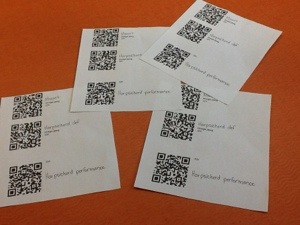
Working on pre-reading (is that the right word?) strategies I thought I was pretty clever today. I had the vocabulary on cards:
then made up QR Codes that students could scan with their iPod or iPad and be taken directly to websites.

One website was a YouTube video of harpsichord playing, another had a definition of the harpsichord, and the third had a YouTube video of Mozart’s music. Pretty cool, right?
Well, students were told that it is a good strategy to ask yourself questions before reading so that their mind is “in gear” and ready for the topic. I asked them to write some questions.
Do only old people listen to this music?
sigh
Click here for a copy of the Before Reading Poster.
Great Document

Have you seen this document: The Ontario Curriculum Unit Planner: Special Education Companion ?
It has definitions of different disabilities and classroom strategies and suggestions. A really helpful resource!
Appy Friday!
Today some students read a short nonfiction passage, then scanned the question sheet that went with it, highlighted their answers right on their iPod or iPad, then emailed it to me.

Students were so excited with this today! No pencil, just their iPod or iPad! AND they were gladly reading!! A win win.
Walking the Line Between Home and School
As teachers we hear about home and no doubt home hears about teachers. As a parent and a teacher I can chuckle at many of the anecdotes my children tell me, usually seeing the bigger picture of where and how incidents are happening.
As a teacher, the line between home and school can sometimes get blurry. For example, when a young student can’t stop talking about playing a rated “M” video game that I do not agree with and would not allow in my home. Or the student that brags about how late he goes to bed or how little sleep he gets. I want to respect and honour parents but I want to offer an opinion and observations as well. If I am to be influential in a child’s life, how do I walk this line?
My prayer is the serenity prayer:
“God, grant me the serenity to accept the things I cannot change,
courage to change the things I can,
wisdom to know the difference.”
(The original serenity prayer was written in the early 1930s or 40s by Reinhold Niebuhr for one of his sermons.)